
How to Convert a WordPress Site Into a Mobile App

By Appilix Software
June 20, 2026 • Updated July 7, 2026
Millions of WordPress users have built thriving websites, but many face the same challenge: their audience is increasingly mobile-first, yet their WordPress site isn't delivering the app-like experience users expect. Converting WordPress to app solves this problem — but only if the conversion method is fast, simple, and doesn't require you to rebuild from scratch or hire expensive developers.
The question isn't whether you need an app — it's how to get one without disrupting the WordPress platform you've already invested in. For years, this meant either hiring developers (expensive, slow) or using clunky plugins (limited, unreliable). But modern technology has changed the game.
Instead of abandoning your WordPress site, you can now turn WordPress to app and transform it into a native Android and iOS app that preserves all your content, functionality, and customizations while adding native mobile features like push notifications, home screen presence, camera access, biometric authentication, and more. Appilix is a leading example of this new generation of platforms — it works with any WordPress site, no plugins to install, no APIs to configure, no WordPress modifications needed.
This applies whether you're running a blog, a WooCommerce store, or a service-based business. The ability to go from WordPress to app has never been more straightforward.
This guide walks you through everything you need to know about converting WordPress to app: how it works, why platforms like Appilix are game-changers, costs, timelines, and step-by-step instructions so you can make an informed decision about which approach fits your business.
By the end, you'll understand not just how to convert your WordPress website into an app, but why it's become the fastest way for WordPress site owners to enter the mobile app market.
The shift from web to mobile isn't coming — it's already here. WordPress powers over 43% of all websites globally, yet most WordPress site owners are watching their audience slip away to mobile-first competitors who offer apps. This is especially true for WooCommerce store owners, where mobile conversion rates are now 20-30% higher than desktop.
Here's the reality: a mobile app isn't a luxury anymore. It's a retention tool, a discovery channel, and a competitive necessity. WordPress to app conversion has become so popular because app users are simply more engaged than web users.
Mobile devices now account for over 58% of global web traffic, and that number keeps climbing. But here's what matters more than traffic: intent. Users on mobile devices are more likely to take action — make a purchase, sign up for a newsletter, or consume content repeatedly — when they're using an app instead of a mobile website.
Why? Apps load faster, feel integrated into the user's phone, and offer features that websites simply can't match. A WordPress website viewed on mobile is still just a website. An app is a permanent presence on someone's home screen. For WooCommerce store owners, this is critical: mobile shoppers who have your store as an app are 3x more likely to complete a purchase than those browsing via mobile browser.
The engagement gap between apps and mobile websites is dramatic. Users spend 90% of their mobile time in apps, not in mobile browsers. Even more telling: the average person has 80+ apps on their phone but visits only 30 regularly.
When you have a mobile app, you're creating a direct line to your most engaged users. Apps generate higher session duration, more frequent returns, and better conversion rates than mobile websites.
A blog might see 10% of visitors return monthly. The same content delivered through an app? Return rates typically jump to 40-60%, depending on how actively you push updates and engage users. For WooCommerce stores, the impact is even sharper: having a mobile app can increase repeat purchase rates by up to 50%.
Here's where a mobile app becomes a business strategy. Push notifications work. They drive engagement, remind users about new content, and keep your brand top-of-mind in a crowded app ecosystem.
WordPress websites have no native push notification system. You can add plugins that send browser notifications, but they're clunky, low-engagement, and easily dismissed. A native mobile app sends real push notifications that appear on the user's lock screen, home screen, and notification center.
For WooCommerce store owners, Firebase-powered push notifications mean you can notify customers about flash sales, new product launches, or cart reminders directly on their phones. The result? Higher click-through rates, better user retention, and measurable business impact.
Finally, there's discovery. WordPress sites are found through search engines. Apps are found through app stores — a completely different marketplace with its own ranking algorithm, featured collections, and user psychology.
By having a mobile app version of your WordPress site, you gain visibility in two places simultaneously: your mobile web presence remains indexed in Google, and your app is now discoverable in the Google Play Store and Apple App Store. This doubles your potential reach. For WooCommerce businesses, this means customers can discover your store through both traditional search and app store browsing.
Before diving into how to get started, you need to understand what's actually happening under the hood. There's often confusion about whether conversion means rebuilding your site, losing functionality, or getting stuck with a "lite" version. None of that is true.
A simple web wrapper takes your WordPress site's URL and displays it inside an app container. It's quick, but limited: it doesn't feel like a native app, and native features like push notifications don't work well.
True advanced conversion is different. It reads your live website and rebuilds the front-end as a true native Android and iOS app. Your app isn't just displaying your WordPress site in a browser window — it's a genuine native application that feels, loads, and performs like an app designed from the ground up.
The key advantage: you get native app performance (fast loading, smooth animations, powerful features) while keeping 100% of your WordPress content and functionality intact. Your WooCommerce store's product catalog, customer reviews, inventory system — all of it works seamlessly with your app.
One of the biggest fears is that WordPress to app conversion requires extensive setup or loses content. It doesn't.
Your WordPress site remains completely unchanged. Advanced conversion platforms like Appilix read your live website directly, extracting content in real-time. Any updates you make to your WordPress site automatically sync to the app through Live Content Sync. Publish a new blog post or add a WooCommerce product, and it appears in the app within minutes.
You have one source of truth (your WordPress site), and the app is just another front-end displaying that same content in native mobile format. No API setup, no plugin installation, no WordPress configuration needed.
When you use advanced conversion technology, you unlock capabilities that don't exist on a website:
Push Notifications — Send real push notifications directly to users' phones about new blog posts, WooCommerce product launches, or announcements. These appear on lock screens and are far more effective than email.
Home Screen Presence — Your app sits on users' home screens alongside Instagram and Twitter. This constant visual reminder keeps your brand top-of-mind.
Camera & Microphone Access — Native access to device features for enhanced user experiences.
Biometric Authentication — Fingerprint or face recognition login for secure, frictionless authentication.
App Store Distribution — Get listed in Google Play and Apple App Store with proper app store approval.
Native Performance — Apps run faster than mobile websites because they use device resources more efficiently.
Live Content Sync — Your app stays automatically updated as you update your WordPress site.
Monetization — AdMob integration for advertising, plus In-App Purchase support.
All of this comes from properly converting a website to an app. You're gaining a parallel distribution channel that brings your WordPress content to mobile users in the format they prefer.
When you're ready to move forward, you have three distinct paths. Each has different costs, timelines, and trade-offs.
You hire a mobile app developer to build a custom native app from scratch using Swift for iOS and Kotlin for Android.
Pros:
Cons:
Best for: Large enterprises with significant budgets.
Not ideal for: Small businesses, bloggers, or WordPress site owners who want a faster, more affordable solution.
Plugins claim to turn your WordPress site into an app by running on your WordPress server.
Pros:
Cons:
Best for: Budget-conscious users who don't mind limitations.
Not ideal for: Businesses wanting a genuine native app experience.
Modern WordPress to app platforms extract your website's content directly and build a true native app — no WordPress plugins needed, no server-side setup required. Appilix is the leading example of how to turn WordPress to app efficiently.
Here's what makes Appilix different: it works with your WordPress site exactly as it is. You don't install plugins, configure APIs, or modify your WordPress installation. Appilix reads your live website directly, regardless of which plugins you're using, and converts it into a fully functional native app.
Pricing:
All plans include: Live Content Sync, Firebase Push Notifications (unlimited), AdMob Monetization, Camera/Microphone/Location access, Biometric Auth, QR Scanner, Deep Linking, Google Sign-In, In-App Purchase support, Custom CSS & JS, 15-day free trial, full refund within 7 days.
Pros:
Cons:
Why Appilix stands out: It's the only solution that's truly plug-and-play. You don't need to understand APIs or hire technical help. The app is ready in weeks, not months, for a fraction of custom development costs. Appilix's Live Content Sync means your app stays updated automatically.
Best for: WordPress site owners, bloggers, WooCommerce store owners, and small-to-medium businesses who want a real mobile app without technical setup burden.
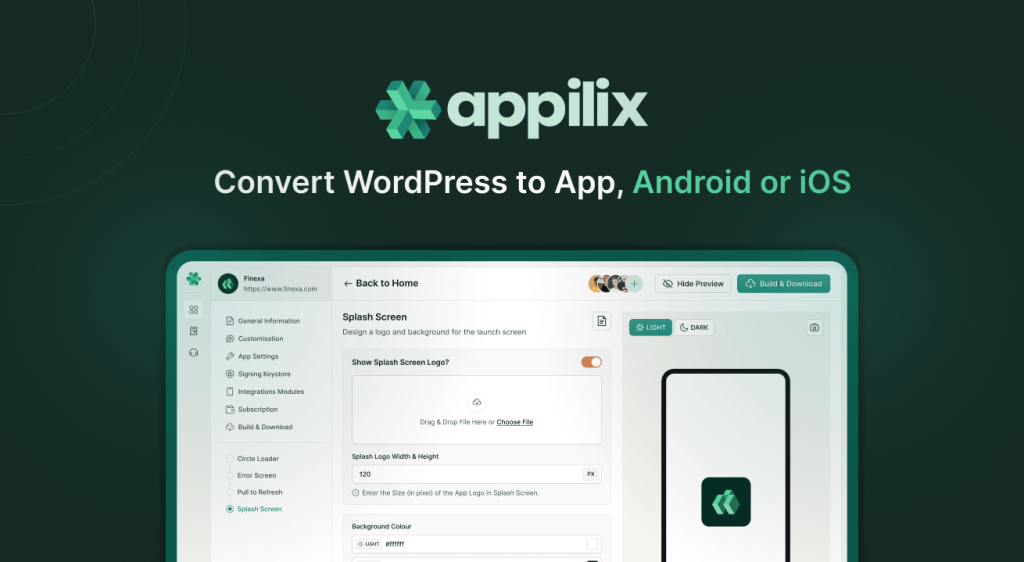
If you've chosen Appilix (the fastest and most accessible route for most WordPress site owners), here's what the actual process looks like. The timeline is typically 1–2 weeks from start to app store submission.
Start by signing up for Appilix. You'll get access to the browser-based dashboard where you'll build your app. Appilix offers a 15-day free trial so you can test the platform with your WordPress site before committing to a subscription.
During signup, you have the option to explore Appilix's full feature set: Live Content Sync, Firebase Push Notifications, AdMob monetization, Camera & Microphone access, Biometric Auth, QR Scanner, and Custom CSS & JS.
This is where Appilix's simplicity shines — making it the easiest way to turn WordPress to app. You don't need to install plugins, configure APIs, or modify your WordPress site.
Simply provide your WordPress site URL: Paste your site URL into Appilix. That's it. No authentication tokens, no REST API setup, no WordPress configuration needed.
Appilix's advanced conversion technology reads your live website directly, whether your WordPress site uses WooCommerce, Yoast, custom plugins, or any combination of tools. It works with your site exactly as it is. This is what makes turning WordPress to app with Appilix so powerful.
Appilix automatically detects your content: Your blog posts, pages, WooCommerce products, categories, and navigation structure are instantly available in Appilix's dashboard. You don't need to select or map anything — it's all there, ready to customize. Going WordPress to app has never been this automatic.
Now you'll tailor your app to match your brand. Appilix's intuitive dashboard makes this straightforward.
Upload your logo and app icon: These appear in the app store listing and on the user's home screen.
Choose your color scheme: Set primary and secondary colors to match your brand. For WooCommerce stores, match your app colors to your website's branding.
Customize your app name and description: This is what appears in app store listings. Make it clear and compelling — e.g., "TechBlog App" or "Sarah's Handmade Store."
Design your home screen: Choose what users see when they first open your app. For blogs, this might be your latest posts. For WooCommerce, it's typically featured products.
Set up your navigation structure: Appilix provides flexible navigation options including Bottom Navigation, Navigation Drawer, and Floating Action Button. Organize your content logically.
Configure advanced features (optional):
Test your WooCommerce integration (if applicable): Verify that your products, prices, and checkout flow appear correctly. The integration happens automatically — no setup needed.
Before going live, test your app thoroughly.
Use Appilix's testing tools: Test your app on your own iPhone and Android phone. Test everything: navigation, loading times, forms, WooCommerce checkout, and push notifications.
Check for bugs: Look for broken links, missing images, slow loading, or layout issues.
Use the 12 Testers Service: Distribute your app to external testers for feedback before launch.
Once you're satisfied, it's time to go live.
Appilix Managed Publishing Service: Appilix handles the app store submissions for you. They manage all technical requirements, compliance documentation, and submission processes with Google Play and Apple App Store.
You don't need to:
Approval timeline: Apple typically reviews and approves apps within 24–48 hours. Google is usually faster.
Your app is live: Once approved, your app is listed in both the Google Play Store and Apple App Store, discoverable by millions of potential users.
Ongoing updates: As you update your WordPress site, Appilix's Live Content Sync automatically reflects those changes in your app. New blog posts appear instantly, WooCommerce products sync in real-time. Use Appilix's Unlimited App Rebuilds to push updates whenever you need them.
Monitor and engage: Use your Appilix dashboard to view analytics, send unlimited push notifications, and track user engagement. Your Live Support team is available to help with any questions.
Understanding the total cost of each approach — not just the upfront price, but what you'll pay over time — is crucial to making the right decision.
Custom native app development is expensive. Initial development costs $5,000–$50,000 depending on complexity. After launch, budget another $500–$2,000/month for maintenance, updates, and bug fixes. Timeline? 3–6 months before your app is live, and that doesn't include ongoing feature development costs. Total 2-year cost: $17,000–$98,000+. Best for large enterprises with massive budgets and highly specialized requirements.
Plugin-based solutions cost $50–$300/month with potential setup fees ($500–$2,000). Total 2-year cost: $1,200–$7,200. The catch: you get an app that feels like a mobile website wrapped in an app shell. Performance is sluggish, push notifications are limited, WooCommerce integration is often incomplete, and Apple/Google frequently reject these apps for lacking genuine app functionality. Best for budget-conscious users who don't mind performance limitations.
Appilix offers a completely different model: one-time payment, no recurring fees. Android Standard is $119, Android Premium is $229, iOS Standard is $149, iOS Premium is $269. The best value is the Combo (Android + iOS Premium) at $439 one-time. You pay once and own your app forever — no monthly subscriptions, no surprise charges, no renewal costs. Setup takes 1–2 weeks with full platform support included.
Every plan includes Live Content Sync, unlimited Firebase Push Notifications, AdMob monetization, camera/microphone/location access, biometric auth, QR scanner, custom CSS & JS, deep linking, Google Sign-In, and in-app purchase support. Premium plans add priority support, 12 Testers Service, and Managed Publishing Service. Total 2-year cost: $119–$439. Best for WordPress site owners who want to turn WordPress to app at a fraction of the cost and timeline of other methods.
| Criteria | Hire a Developer | WordPress Plugin | Appilix |
|---|---|---|---|
| Initial Cost | $5,000–$50,000 | $0–$2,000 | $119–$439 |
| Monthly Cost (Year 1) | $500–$2,000 | $50–$300 | $0 |
| 2-Year Total | $17,000–$98,000 | $1,200–$7,200 | $119–$439 |
| Time to Launch | 3–6 months | 2–4 weeks | 1–2 weeks |
| Native Performance | Excellent | Poor–Fair | Excellent |
| Push Notifications | Yes | Limited | Yes (Unlimited) |
| Live Content Sync | Custom work | No | Yes (Automatic) |
| WooCommerce Integration | Custom work | Partial | Full (Automatic) |
| App Store Approval Speed | Varies | Slower | Fast (24–48 hrs) |
| Ongoing Maintenance Costs | $500–$2,000/mo | $50–$300/mo | $0/mo |
Not all web-to-app platforms are created equal. When evaluating your options for WordPress to app, prioritize these essential features to ensure you're getting a genuine mobile app with real capabilities, not just a wrapper.
App Store Deployment — Your app needs to be listed in both the Google Play Store and Apple App Store. Look for platforms that handle submissions for you. Appilix includes Managed Publishing Service in Premium plans.
Push Notifications — Confirm push notifications are included (not an expensive add-on) and work reliably. Appilix includes unlimited Firebase-powered push notifications in every plan.
Live Content Sync — Your app should update automatically as your WordPress site updates. Appilix's Live Content Sync is automatic and included in every plan. Publish a new blog post or add a WooCommerce product, and it's live in your app within minutes.
Monetization Options — Look for AdMob integration for advertising, in-app purchases for digital goods, and seamless WooCommerce integration. Appilix supports all of these in every plan.
Advanced Mobile Features:
Customization & Analytics:
Support:
Appilix includes all of these features in every plan, making it the most feature-complete solution available for WordPress to app conversion.
Even with the right platform, you may encounter obstacles during or after conversion. Here's what to watch for and how to solve it.
Plugin Compatibility Issues — Your WordPress site likely uses plugins for SEO, caching, security, and other functions. The good news: most plugins don't affect app conversion because the app doesn't run on WordPress at all. Appilix extracts your content and builds a separate native app. Your SEO plugins, caching plugins, and security plugins continue to work on your WordPress site — they just don't matter for the app. If you have a membership plugin restricting content, work with your platform's support team to configure access.
Complex Custom Code and APIs — If you've built custom functionality into your WordPress site (custom post types, API endpoints, advanced WooCommerce customizations), ensure the app can access this content. Look for platforms that allow custom API integration or have developer support. If your WordPress site exposes custom data via REST API, a good platform can fetch and display it in the app.
Performance and Load Times — If your WordPress site is slow, the app will be slow too. Optimize your WordPress site before conversion: compress images, enable caching, remove unused plugins, and consider a CDN. For WooCommerce stores, optimize product images (under 500KB each) and ensure your hosting can handle API requests quickly.
App Store Approval and Guidelines — Apple and Google have strict guidelines. Apps that are just wrappers with no added value get rejected. This is why genuine WordPress to app conversion (which builds true native apps) is better than simple web wrappers. Appilix's advanced conversion avoids this issue. Choose a platform with a strong track record of approvals, provide clear descriptions and screenshots, and test thoroughly before submission.
Apps built from WordPress sites deliver real business results across different industries.
Content Blogs and Publishers — A travel blog with 50,000 monthly readers decided to convert WordPress to app. Within three months, 15% of their audience had installed the app. Push notifications about new articles drove a 35% increase in repeat visits. Readers could now save articles offline and browse during commutes. The blog monetized the app through AdMob, generating an additional $2,000/month in ad revenue.
Key results:
WooCommerce E-Commerce Stores — A handmade jewelry store running WooCommerce converted to an app with Appilix. App users spent 3x longer browsing products compared to mobile website visitors. Cart abandonment dropped 25% because push notifications reminded customers about items in their carts. The app became their second-highest revenue channel, accounting for 30% of monthly sales within six months.
Key results:
Service-Based Businesses — A local fitness coaching business converted their WordPress site to an app. Clients could book sessions, receive class reminders via push notifications, and access workout videos directly from the home screen. App engagement increased dramatically — 60% of clients opened the app at least weekly, compared to 10% who visited the website regularly. The business reduced no-shows by 40%.
Key results:
Each of these businesses chose to turn WordPress to app because the speed, cost, and simplicity made it feasible. None had the budget for custom development. All saw immediate business impact within months.
Understanding how long each method takes is crucial to your decision. Here's what you can realistically expect.
Hiring a Developer: 3–6 Months (or longer)
Custom app development is a lengthy process. First comes discovery and planning (2–4 weeks). Then design and development (8–12 weeks). Then testing, revisions, and bug fixes (2–4 weeks). Then app store submission and approval (1–2 weeks). If Apple or Google rejects your app, you're back to development and resubmission. Total: 3–6 months minimum, often longer for complex features.
WordPress App Builder Plugins: 2–4 Weeks
Plugins are faster because they're templates. Setup takes a few days, customization takes 1–2 weeks, testing takes a few days, and submission takes 1 week. The downside: limited customization means you're constrained by what the plugin offers. If you need changes outside the plugin's capabilities, you're stuck.
Appilix: 1–2 Weeks
Appilix is the fastest option when you want to turn WordPress to app. Sign up (minutes), connect your WordPress site (5 minutes), customize branding and settings (1–2 days), test on devices (1 day), submit to app stores (Appilix handles this). Apple approval takes 24–48 hours. Google approval is usually within 24 hours. Your app can be live in the Google Play Store and Apple App Store within 1–2 weeks.
Timeline Comparison:
| Method | Setup | Customization | Testing | Submission | Approval | Total |
|---|---|---|---|---|---|---|
| Hire Developer | 2–4 wks | 8–12 wks | 2–4 wks | 1–2 wks | 1–2 wks | 3–6+ months |
| WordPress Plugin | 2–3 days | 1–2 wks | 3–5 days | 1 wk | 2–4 wks | 2–4 weeks |
| Appilix | Minutes | 1–2 days | 1 day | Appilix handles | 24–48 hrs | 1–2 weeks |
The difference is dramatic. Appilix gets you to market 12–26 weeks faster than hiring a developer and 1–3 weeks faster than plugins.
What's the difference between a web wrapper and true wordpress to app conversion?
A web wrapper displays your WordPress site inside an app container. It's quick but limited — it doesn't feel like a native app, performs poorly, and doesn't support native features like reliable push notifications. True wordpress to app conversion reads your live website and rebuilds it as a genuine native Android and iOS app with proper performance and all native capabilities.
Do I need to modify my WordPress site to use a wordpress to app platform?
No. Advanced conversion platforms like Appilix read your live website directly. You don't install plugins, configure APIs, or change anything on your WordPress site. The platform works with your site exactly as it is — whether you're using WooCommerce, Yoast, custom plugins, or anything else. This is what makes wordpress to app conversion so simple.
Will my WooCommerce store work in the app when I turn wordpress to app?
Yes. Your entire product catalog, prices, checkout process, and payment gateway sync automatically with the app through Live Content Sync. When you add a product or change a price on your WordPress site, it appears in the app within minutes. No setup required. This seamless integration is one of the biggest advantages of wordpress to app solutions.
Can I update my app without resubmitting to app stores?
Updates to your WordPress site automatically sync to the app through Live Content Sync — new blog posts, products, and content appear instantly. For app functionality or design changes, you rebuild the app (Appilix includes unlimited rebuilds). You only resubmit to app stores if the app binary changes, which is infrequent. This is why wordpress to app platforms are so efficient for ongoing maintenance.
How much does it cost to convert wordpress to app compared to hiring a developer?
Custom development costs $5,000–$50,000 upfront plus $500–$2,000/month for maintenance. WordPress plugins cost $50–$300/month. Appilix is a one-time payment of $119–$439 with zero ongoing fees, no monthly subscriptions, and you own your app forever. There's no comparison — wordpress to app conversion with Appilix is by far the most affordable option.
Can I customize my app's appearance and branding with wordpress to app platforms?
Yes. You can customize colors, fonts, logos, app icons, navigation, home screen layout, and more through Appilix's dashboard. For advanced customization, Custom CSS & JS is included in every plan, letting you fine-tune appearance and behavior. When you choose a wordpress to app solution, you maintain full control over your brand identity.
What happens if a wordpress to app conversion platform shuts down?
This is a valid concern with any platform. Choose a platform with strong backing, transparent business practices, and positive user reviews. Appilix is a stable, established platform with a growing customer base and continuous feature development, making it a reliable choice for your wordpress to app needs.
How long does app store approval take when using wordpress to app services?
Apple typically reviews and approves apps within 24–48 hours. Google is usually faster (within 24 hours). Appilix's Managed Publishing Service handles all submissions, so you don't navigate the approval process yourself. This speed is one of the key advantages of using a wordpress to app platform instead of hiring developers.
Do I get analytics and user engagement data with wordpress to app conversion?
Yes. Appilix provides a dashboard with analytics including downloads, active users, session duration, content engagement, and conversion data. You can track which features users interact with most and optimize accordingly. Understanding user behavior is essential when you convert wordpress to app.
Can I earn money from my app when I turn wordpress to app?
Yes. Appilix supports AdMob for in-app advertising, in-app purchases for digital goods, and direct WooCommerce sales. You can also use AppsFlyer SDK for marketing analytics and attribution. Monetization is built in when you use wordpress to app technology like Appilix.

Appilix can help. Let's start!